 Express Login
 Contact Us
 RMU Login
 Customer Portal

Rent Manager MCP Connector
This page describes the Rent Manager MCP Connector for Claude, a connector that lets Claude answer questions about live Rent Manager data across financials and budgeting, maintenance and service issues, tenant management, and prospect management and leasing, directly from a conversation. It covers what the connector does, what you can ask it, its current limitations, how to connect and authenticate, how your data is handled, and where to get support. This page also serves as the public documentation required for the connector’s listing in Anthropic’s Claude Connectors Directory.
Overview
Getting answers out of Rent Manager usually means knowing which report to run, exporting it, and reading through the results yourself. The Rent Manager MCP Connector removes those steps. It links your Rent Manager data to Claude so you can ask a question in plain language and get an answer back in seconds, whether you are checking on a past due tenant, a stalled service issue, or how a property is tracking against budget.
The connector reads only what your own Rent Manager login can already see, and it cannot change anything in your database. It reports on your data, it never edits it.
Who This is For
Different roles at a company get value from this connector in different ways. This table outlines who benefits most and what it helps them do day to day.
| Role | Description |
| Property Managers | Get quick answers about portfolio status, maintenance issues, leasing activity, and tenant status without digging through reports. |
| Leasing Agents | Get real-time visibility into prospect activity, unit availability, and the leasing pipeline without relying on someone else to pull the data. |
| Accountants | Get fast access to financial data and trends without manually exporting and reconciling reports. |
- Publisher: London Computer Systems, Inc.
- Category: Productivity / Property Management
- Works with: Claude web app, Claude desktop app, Claude mobile app, Claude Code, Claude API
- Capabilities: Write. This connector is able to create, edit, or delete in Rent Manager, where allowed. Currently, only the location can be edited when changing locations in Rent Manager. All other tools are set to be read-only.
What You Can Ask
The Rent Manager MCP Connector connects directly to your Rent Manager database through Rent Manager’s Web API, so it always reflects the same information you see in Rent Manager itself, with no exports or manual updates required. The example prompts below are grouped by workflow, such as tenant management, financials, leasing, and maintenance, and reflect the kinds of questions you can ask about your live data.
Tenant Management
- “Which tenants have a lease ending in the next 60 days?”
- “Show me all past due tenants organized by property manager and include each tenant’s typical payment history over the last 12 months so I can spot anyone who is out of their normal pattern.”
- “Which tenants have had a lease end date pass without a rent increase or charge modification in the last 90 days.”
Financial Health and Budgeting
- “Project my rental income for the next 12 months accounting for actual lease end dates, expected vacancy periods, and a 5% planned rent increase.”
- “List all outstanding charges for a tenant or unit.”
- “Review all owner statements for this disbursement period and call out any discrepancies including undeposited funds, unapplied payments, duplicate transactions, or charges that are inconsistent with prior months.”
Prospect Management and Leasing
- “Give me a combined report of upcoming move out dates, current lease expirations, and open prospect applications sorted by property.”
- “Show me all units that will be vacant in the next 30 days along with any pending applications for those units.”
- “Show me all active prospects who have had no leasing agent activity or status update in the last seven days, grouped by agent so I can see whose leads are going cold.”
Maintenance and Service Issues
- “List open service manager issues at [property], sorted by date opened.”
- “Show me the average time to close a service issue by technician for the last 90 days ranked from fastest to slowest.”
- “Which units or properties have the highest volume of service requests in the last 90 days and what are the most common issue categories driving that volume?”
Connecting Rent Manager to Claude
Prerequisites
The following prerequisites are required:
- An active Rent Manager account.
- A Rent Manager user role with permission to the data you want Claude to access — the connector only ever sees what that login can already see; it does not grant new access.
- A Claude plan that supports connectors.
Licensed Feature
This feature is licensed and must be purchased separately. For more information, contact your sales representative at sales@rentmanager.com.
To add the Rent Manager connector to Claude, do the following:
1
In Claude, open your connector settings and browse the available connectors. The exact path can vary depending on whether you are using the desktop app or the web version.
2
Locate Rent Manager and select the option to connect it.
3
Sign in with your Rent Manager credentials. If your organization uses single sign-on for Rent Manager, you are redirected to your SSO sign-in page instead.
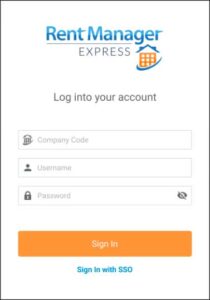
Multi Factor Authentication Pop Up
If multi-factor authentication (MFA) is enabled for your account but you have not finished setting it up, you cannot connect to the MCP. A pop-up displays prompting you to complete your MFA setup before continuing.
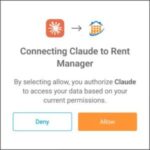
4
Review and approve the requested access.
5
Confirm that Rent Manager displays in your list of connected apps.
Authentication and Permissions
- The connector authenticates via OAuth 2.1.
- Access is scoped to whatever your Rent Manager user role already permits — property, tenant, and unit data is limited the same way it would be inside Rent Manager itself.
- This connector is able to write when changing locations. All of the other tools have no write/destructive actions to confirm and are only lookup tools.
- Disconnect at any time. Open your connector settings in Claude, locate Rent Manager in your list of connected apps, and select the option to disconnect it.
- Disconnecting Rent Manager revokes Claude’s access to your Rent Manager data.
What This Connector Can’t Do
- It can write only when changing locations in Rent Manager, otherwise it does not create, edit, or delete other data such as transactions, lease information, service issues, etc.
- It cannot move money or process any financial transaction.
- It cannot bypass Rent Manager user permissions. If the connected login can’t see a property or record, neither can Claude.
- It reflects data as of the time of the query, not a live streaming feed; very large portfolio-wide queries may be paginated or summarized.
- It does not generate images, video, or synthetic media.
Data Handling
- Data is retrieved live from Rent Manager’s Web API using the connected user’s authenticated session; it is not stored by the connector beyond what’s needed to answer a given request.
- Data is not used to train AI models.
Support
- Privacy Policy: Privacy Statement – Rent Manager Property Management Software.
- Support: Rent Manager Customer Support at (513) 583-1482, Monday–Friday, 8:00 AM–7:00 PM Eastern.